기록은 가장 쉬운 명상입니다.
NextJS 블로그 Google Search Console 등록
3 min read · 2024년 07월 04일
목표
구글에서 내 블로그가 검색되게 하기
과정
next-sitemap
yml# Sample workflow for building and deploying a Next.js site to GitHub Pages # # To get started with Next.js see: https://nextjs.org/docs/getting-started # name: Deploy Next.js site to Pages on: # Runs on pushes targeting the default branch push: branches: ['main'] # Allows you to run this workflow manually from the Actions tab workflow_dispatch: # Sets permissions of the GITHUB_TOKEN to allow deployment to GitHub Pages permissions: contents: read pages: write id-token: write # Allow only one concurrent deployment, skipping runs queued between the run in-progress and latest queued. # However, do NOT cancel in-progress runs as we want to allow these production deployments to complete. concurrency: group: 'pages' cancel-in-progress: false jobs: # Build job build: runs-on: ubuntu-latest steps: - name: Checkout uses: actions/checkout@v4 - name: Detect package manager id: detect-package-manager run: | if [ -f "${{ github.workspace }}/yarn.lock" ]; then echo "manager=yarn" >> $GITHUB_OUTPUT echo "command=install" >> $GITHUB_OUTPUT echo "runner=yarn" >> $GITHUB_OUTPUT exit 0 elif [ -f "${{ github.workspace }}/package.json" ]; then echo "manager=npm" >> $GITHUB_OUTPUT echo "command=ci" >> $GITHUB_OUTPUT echo "runner=npx --no-install" >> $GITHUB_OUTPUT exit 0 else echo "Unable to determine package manager" exit 1 fi - name: Setup Node uses: actions/setup-node@v4 with: node-version: '20' cache: ${{ steps.detect-package-manager.outputs.manager }} - name: Setup Pages uses: actions/configure-pages@v5 with: # Automatically inject basePath in your Next.js configuration file and disable # server side image optimization (https://nextjs.org/docs/api-reference/next/image#unoptimized). # # You may remove this line if you want to manage the configuration yourself. static_site_generator: next - name: Restore cache uses: actions/cache@v4 with: path: | .next/cache # Generate a new cache whenever packages or source files change. key: ${{ runner.os }}-nextjs-${{ hashFiles('**/package-lock.json', '**/yarn.lock') }}-${{ hashFiles('**.[jt]s', '**.[jt]sx') }} # If source files changed but packages didn't, rebuild from a prior cache. restore-keys: | ${{ runner.os }}-nextjs-${{ hashFiles('**/package-lock.json', '**/yarn.lock') }}- - name: Install dependencies run: ${{ steps.detect-package-manager.outputs.manager }} ${{ steps.detect-package-manager.outputs.command }} - name: Build with Next.js run: ${{ steps.detect-package-manager.outputs.runner }} next build - name: Generate Sitemap run: ${{ steps.detect-package-manager.outputs.runner }} next-sitemap - name: Upload artifact uses: actions/upload-pages-artifact@v3 with: path: ./out # Deployment job deploy: environment: name: github-pages url: ${{ steps.deployment.outputs.page_url }} runs-on: ubuntu-latest needs: build steps: - name: Deploy to GitHub Pages id: deployment uses: actions/deploy-pages@v4
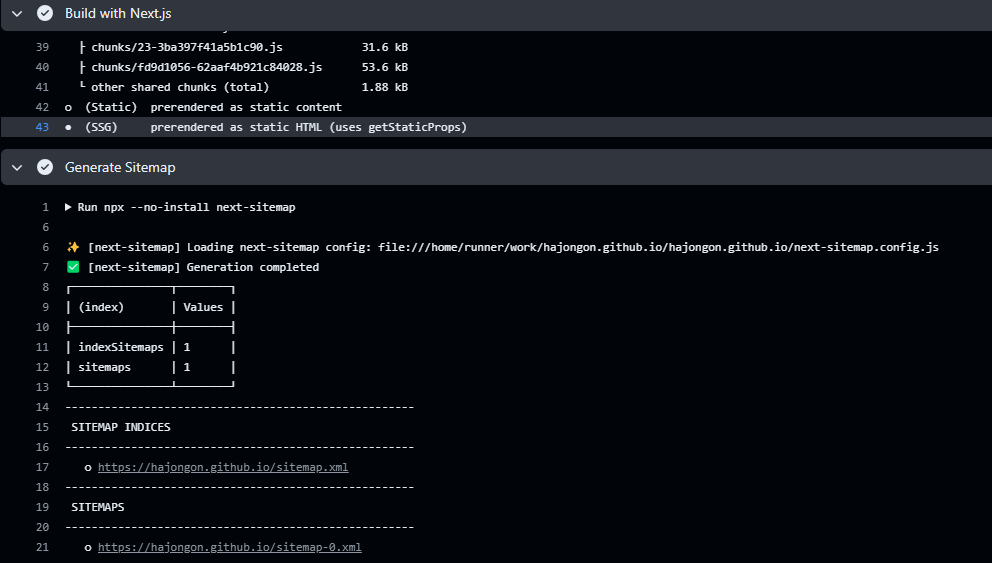 pipeline
이슈
개발 서버에서는
localhost:3000/sitemap.xml 로 접근 시에 sitemap xml 파일이 잘 보였는데,
배포 이후에
hajongon.github.io/sitemap.xml 로 접근 시에는 프로젝트에서 분기 처리한 404 페이지로 가는 이슈가 발생했다.
 404 error
해결
next-sitemap 실행 시에, public 폴더에는 sitemap 파일이 생기지만, out 폴더에 생기지 않아서 배포 이후 파일을 찾지 못하던 것이었다.
github flow 파일에 다음 코드를 추가했다.
yml- name: Generate Sitemap run: ${{ steps.detect-package-manager.outputs.runner }} next-sitemap && cp -r ./public/sitemap*.xml ./out/
 404 error
이제 잘 나옵니다 ㅎㅎ